# Node-RED Workbench

The Connectware Workbench is a built-in Node-RED environment designed for rapid prototyping and testing. This feature provides an accessible, visual programming interface for developing connectivity workflows without extensive coding.

## Prototyping vs. Production Environment

The built-in Node-RED Workbench is designed for prototyping and testing purposes only. It is not recommended for production deployments.

For production environments, create a service commissioning file that installs Node-RED as a dedicated [Cybus:Container resource](https://docs.cybus.io/2-0-0/documentation/services/service-commissioning-files/resources/cybus-container). This approach provides full control over versioning, lifecycle management, and isolation of your Node-RED instance.

## Accessing the Node-RED Workbench

To access the Node-RED Workbench:

1. On the navigation panel, click **Services**.
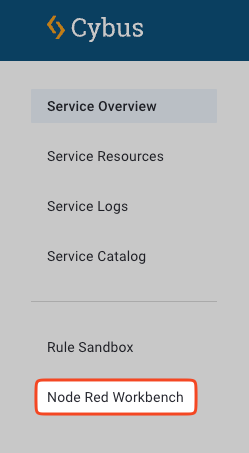
2. In the sidebar, click **Node Red Workbench**.

<figure><img src="https://3652345531-files.gitbook.io/~/files/v0/b/gitbook-x-prod.appspot.com/o/spaces%2Fsig3lxGLw8WEa54nKxj1%2Fuploads%2Fgit-blob-378fa0a48c2d7fc89043deac2db2a521f7e61bb0%2Fmenu_item_workbench.png?alt=media" alt="Menu navigation to access the Node-RED Workbench"><figcaption><p>Accessing the Node-RED Workbench through the sidebar menu</p></figcaption></figure>

3. The Node-RED editor will open in a new browser tab.

{% hint style="info" %}
The default Workbench is intended for prototyping and testing only. For production environments, deploy Node-RED as a dedicated service using a service commissioning file.
{% endhint %}

## Connecting Node-RED to the Connectware API

When creating flows that interact with the Connectware API:

### Connection Parameters

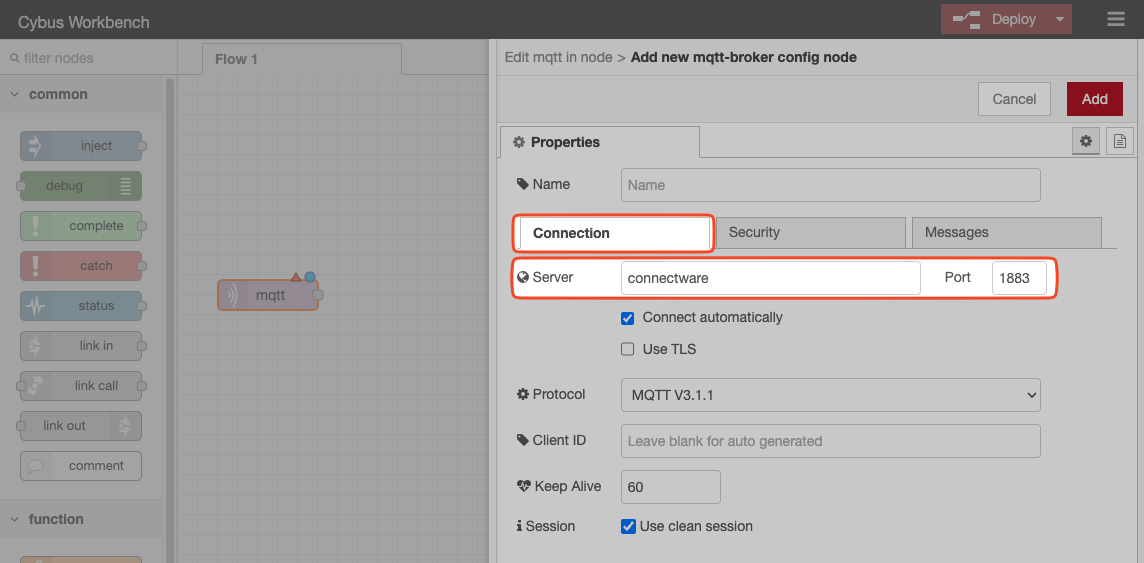
* Use `connectware` as the server name for both:
  * MQTT connections (port 1883)
  * HTTPS connections (port 443)

<figure><img src="https://3652345531-files.gitbook.io/~/files/v0/b/gitbook-x-prod.appspot.com/o/spaces%2Fsig3lxGLw8WEa54nKxj1%2Fuploads%2Fgit-blob-575f8a89d817346775e1318e165f7225be3a106d%2Fnodered-mqtt-server.png?alt=media" alt="Node-RED MQTT connection configuration"><figcaption><p>Configuring MQTT connection to Connectware using the server name "connectware"</p></figcaption></figure>

### Authentication

When subscribing to or publishing on the Connectware server:

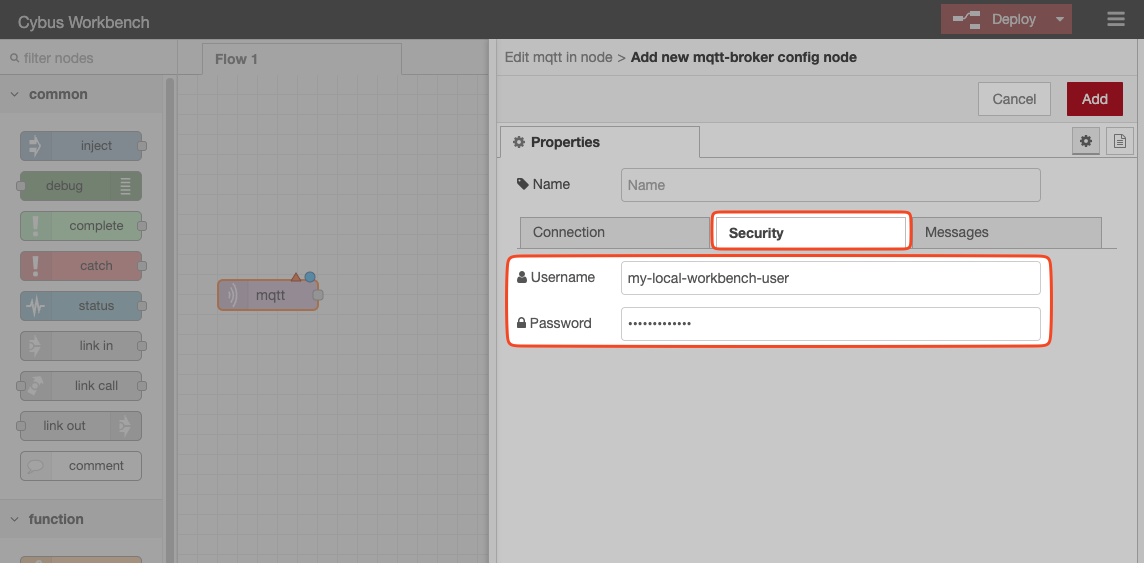
1. Configure the appropriate `username` and `password` in your Node-RED nodes.
2. Ensure the user account has sufficient permissions or roles to access the required topics.

<figure><img src="https://3652345531-files.gitbook.io/~/files/v0/b/gitbook-x-prod.appspot.com/o/spaces%2Fsig3lxGLw8WEa54nKxj1%2Fuploads%2Fgit-blob-2686dae0cd451e368ef10b24b10eafb4e75afaae%2Fnodered-username.png?alt=media" alt="Node-RED authentication configuration"><figcaption><p>Setting up authentication credentials for Connectware access</p></figcaption></figure>

For more information on managing user permissions, see [User Management](https://docs.cybus.io/2-0-0/documentation/user-management).

## Working with Node-RED

For comprehensive guidance on using Node-RED, refer to the official [Node-RED documentation](https://nodered.org/docs).

## Node-Red Workbench Projects

Node-RED Workbench supports Node-RED projects to integrate with Git repositories, allowing you to store and version your flows.

{% hint style="info" %}
Node-RED Workbench projects are only available for Docker deployments and not for Kubernetes deployments.
{% endhint %}

Projects allow you to:

* Store flows in external Git repositories
* Implement version control for your flows
* Collaborate with team members on flow development
* Manage multiple flow projects within the same Workbench

For detailed information about this functionality, refer to the [Node-RED Projects documentation](https://nodered.org/docs/user-guide/projects/).

### Enabling Workbench Projects (Docker)

By default, Node-RED Workbench projects in Connectware are disabled. To enable Node-RED Workbench projects:

1. Open the `.env` file.
2. Set the `CYBUS_WORKBENCH_PROJECTS_ENABLED` variable to `true`.

{% code lineNumbers="true" %}

```yaml
# Workbench Configuration
CYBUS_WORKBENCH_PROJECTS_ENABLED=true
```

{% endcode %}

3. Restart the Connectware instance for the changes to take effect. See [Restarting Connectware](https://docs.cybus.io/2-0-0/documentation/installation-and-upgrades/restarting-connectware).

**Result:** Once enabled, you will see additional project management options in your Node-RED interface.


---

# Agent Instructions: Querying This Documentation

If you need additional information that is not directly available in this page, you can query the documentation dynamically by asking a question.

Perform an HTTP GET request on the current page URL with the `ask` query parameter:

```
GET https://docs.cybus.io/2-0-0/documentation/node-red-workbench.md?ask=<question>
```

The question should be specific, self-contained, and written in natural language.
The response will contain a direct answer to the question and relevant excerpts and sources from the documentation.

Use this mechanism when the answer is not explicitly present in the current page, you need clarification or additional context, or you want to retrieve related documentation sections.