# Installing Services
To deploy a service in Connectware, you must upload its corresponding service commissioning file. This file defines how the service is configured and installed.
## Prerequisites
* **Validate the service commissioning file**: Ensure that your service commissioning file is valid before uploading. If the file contains invalid resources, incorrect references, or other defects, the service will fail to [enable](https://docs.cybus.io/2-0-6/documentation/services/setting-up-and-configuring-services/enabling-services) and be shown as [deviated](https://docs.cybus.io/2-0-6/documentation/services/deviations). In such cases, you must manually reinstall a previously working version of the file.
* **Install parent services first (recommended)**: If the service depends on another service (parent/child relationship), install the parent service first. This ensures:
* Service relations are created during installation.
* Each service can be installed with `targetState=enabled`.
* **Install child services first (alternative)**: It is possible to install the dependent (child) service first, but this comes with limitations:
* Service relations are only established when the service is enabled.
* The dependent (child) service can **only** be installed with `targetState=disabled`.
For more details, see [Service Dependency Behavior](https://docs.cybus.io/2-0-6/documentation/inter-service-referencing#service-dependency-behavior) and [targetState](https://docs.cybus.io/2-0-6/documentation/service-commissioning-files/resources/cybus-endpoint#targetstate).
## Procedure
Follow these steps to upload and install a new service:
1. On the navigation panel, click **Services**.
2. Click **Upload Service** to add a new service commissioning file.
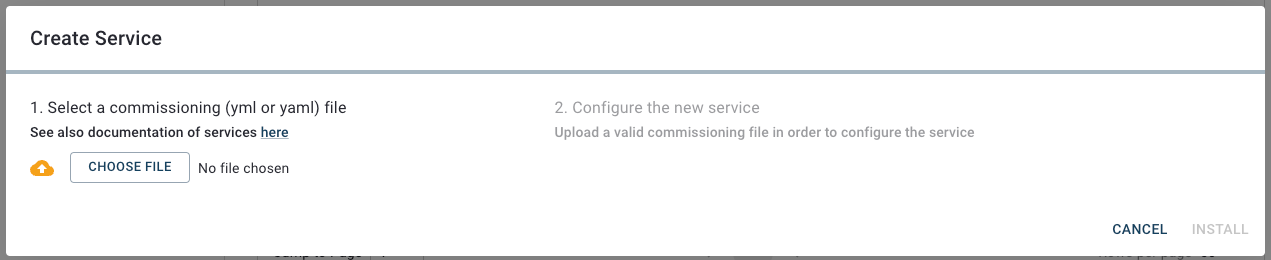
3. In the **Create Service** dialog, click **Choose File**.
4. In your file browser, select your service commissioning file and click **Open**.
JSONata rules are validated during the upload. If the service commissioning file does not meet these rules, the installation will be rejected.
{% hint style="info" %}
The validation checks only syntax (well-formed JSONata), not semantics (e.g., existing Cybus resource references or payloads generated by other services).
{% endhint %}
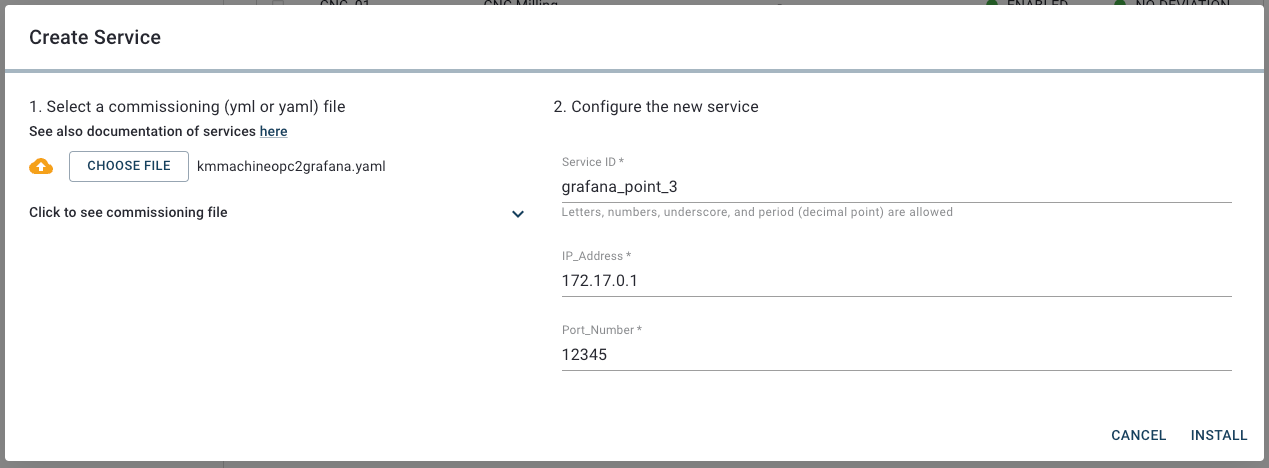
5. The configuration of your service commissioning file is added to the **Configure the new service** section.
6. Define a unique [service ID](https://docs.cybus.io/2-0-6/documentation/services/serviceid).
7. Optional: If your service commissioning file provides configurable parameters, you can customize the values for your service here. Depending on the service commissioning file, parameter descriptions and default values may be available. You can click **Click to see commissioning file** to review your service commissioning file.
8. Once you are finished, click **Install** to install the service.
9. Upon successful configuration, your new service will appear in the service list. Initially, the service has the status **Disabled**.
10. After the installation, you must enable the service. For details, see [Enabling Services](https://docs.cybus.io/2-0-6/documentation/services/setting-up-and-configuring-services/enabling-services).