> For the complete documentation index, see [llms.txt](https://docs.cybus.io/llms.txt). Markdown versions of documentation pages are available by appending `.md` to page URLs; this page is available as [Markdown](https://docs.cybus.io/2-1-0/documentation/industry-protocol-details/siemens-simatic-s7.md).
# Siemens SIMATIC S7
Connect to Siemens SIMATIC S7 PLCs using S7 Communication Services.
The SIMATIC S7 is a product line of PLCs (S7-200, S7-300, S7-400, S7-1200, S7-1500) by Siemens widely used in industrial automation. S7 PLCs connect multiple sensors and actuators through digital or analog I/Os with modular extension capabilities.
S7 PLCs are configured and programmed using STEP 7 (TIA Portal) software from Siemens.
Read and write access to PLC data is realized through S7 Communication Services based on ISO-on-TCP (RFC1006). The PLC acts as a server, allowing communication partners to access PLC data without requiring connection configuration during PLC programming.
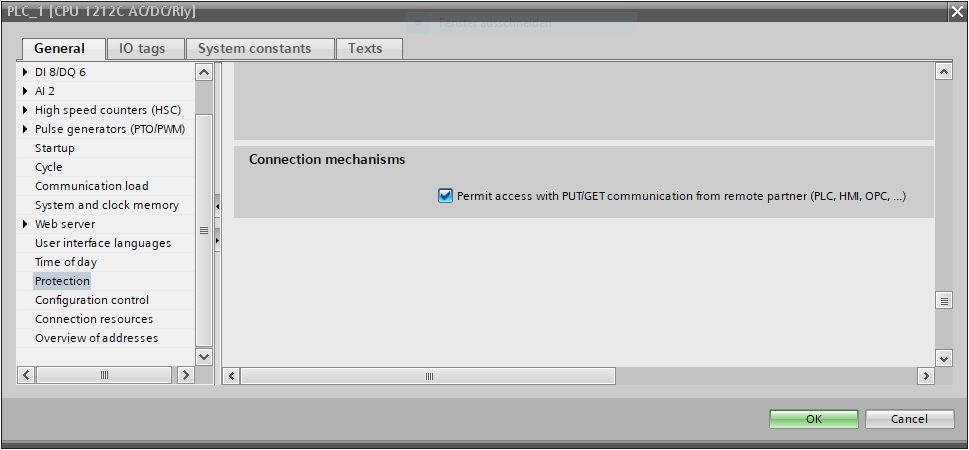
## Activating PUT/GET Access
* To activate S7 Communication Services, enable PUT/GET access in the PLC settings. This allows other applications to access the controller.
## Configuring the Connection
{% hint style="warning" %}
The S7 protocol driver differs from other protocol drivers in polling behavior, as it allows only a single polling interval for all mappings. The driver optimizes requests by grouping multiple readings into as few block reads as possible.
For this reason, set the interval in the connection details rather than in individual mappings. If multiple polling rates are required, use separate service commissioning files. Support for different polling rates in a single service commissioning file may be added in the future.
{% endhint %}
[Connection Properties](/2-1-0/documentation/industry-protocol-details/siemens-simatic-s7/s7connection.md)
### Hardware-Specific Values
| CPU | Rack | Slot |
| ------- | -------------------------- | ---- |
| S7-300 | 0 | 2 |
| S7-400 | See hardware configuration | - |
| WinAC | See hardware configuration | - |
| S7-1200 | 0 | 1 |
| S7-1500 | 0 | 1 |
[Endpoint Properties](/2-1-0/documentation/industry-protocol-details/siemens-simatic-s7/s7endpoint.md)
### Address Structure
The address of a PLC variable is a string with the following structure:
`,..`
#### ``
Name of the data block where the value is stored (e.g., DB10). Only use this parameter if your value is part of a data block.
#### ``
Memory area where the value is stored.
{% hint style="warning" %}
Do not define this if the target is a data block.
{% endhint %}
| Memory area | Address symbol |
| ----------------- | -------------- |
| input | I |
| peripheral input | PI |
| output | Q |
| peripheral output | PQ |
| marker | M |
| counter | C |
| timer | T |
#### ``
Data type of the addressed value. The string data type can only be used in data blocks.
| Data type | Address symbol |
| -------------------------------- | ------------------------ |
| bit | X (or empty) |
| byte | B |
| char | C |
| word | W |
| int16 | I |
| dword | DW |
| int32 | DI |
| real | R |
| int64 | LI (S7-1200/1500 only) |
| lreal | LR (S7-1200/1500 only) |
| string | S (only in data blocks) |
| date\_and\_time | DT |
| date\_and\_time in UTC | DTZ |
| date\_and\_time (12 byte) | DTL (S7-1200/1500 only) |
| date\_and\_time in UTC (12 byte) | DTLZ (S7-1200/1500 only) |
#### ``
The byte offset to address.
#### ``
Specifies the bit position when addressing individual bits. For string data types, this parameter defines the string length.
#### ``
Defines the array length when addressing multiple consecutive values.
The minimum required address information is `` or ``, ``, and ``. Use `` only when addressing individual bits. `` is always optional.
**Address examples**
* MR4 // REAL starting at marker byte 4 (MD4 in STEP 7)
* M32.2 // Bit at marker byte 32 bit 2
* PIW30 // WORD starting at peripheral input byte 30
* PII30 // INT starting at peripheral input byte 30
* DB1,R0.20 // Array of 20 REAL values in DB1 starting at byte 0
* DB1,R4 // Single REAL value
* DB1,REAL8 // Another single REAL value
* DB1,I12.2 // Two INT value array
* DB10,INT6 // DB10.DBW6 as INT
* DB10,I6 // same as above
* DB10,I6.2 // DB10.DBW6 and DB10.DBW8 in an array with length 2
* DB10,S20.30 // String at offset 20 with length of 30 (actual array length 32 due to format of String type, length byte will be read/written)
* DB10,S20.30.3 // Array of 3 strings at offset 20, each with length of 30 (actual array length 32 due to format of String type, length byte will be read/written)
* DB10,C22.30 // Character array at offset 22 with length of 30 (best to not use this with strings as length byte is ignored)
* DB10,X6.0.1 // Bit at DB10.DBX6.0 as array with length 1
* DB10,DT0 // Date and time
* DB10,DTZ0 // Date and time in UTC
{% hint style="warning" %}
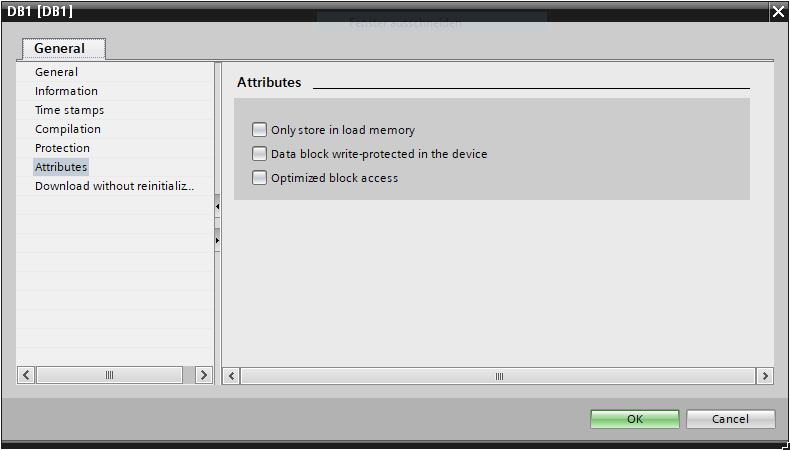
To access data from data blocks, disable **Optimized Block Access** in the data block attributes.
{% endhint %}
## Service Commissioning File Example
{% file src="/files/iTcmg5XZpBQja4dqlRID" %}
{% code title="s7-example.yml" lineNumbers="true" expandable="true" %}
```yaml
---
# ----------------------------------------------------------------------------#
# Commissioning File
# ----------------------------------------------------------------------------#
# Copyright: Cybus GmbH (2020)
# Contact: support@cybus.io
# ----------------------------------------------------------------------------#
# Source Interface Definition - Siemens S7 PLC
# ----------------------------------------------------------------------------#
# ----------------------------------------------------------------------------#
description: |
Sample commissioning file for Siemens S7 PLC connectivity and data mapping
metadata:
name: S7 Protocol Connectivity
icon: https://www.cybus.io/wp-content/uploads/2019/03/Cybus-logo-Claim-lang.svg
provider: cybus
homepage: https://www.cybus.io
version: 0.0.1
parameters:
IP_Address:
type: string
default: 192.168.10.60
Port_Number:
type: integer
default: 102
Rack_Number:
type: integer
default: 102
Slot_Number:
type: integer
default: 102
Poll_Interval:
type: integer
default: 1000
resources:
s7Connection:
type: Cybus::Connection
properties:
protocol: S7
targetState: connected
connection:
host: !ref IP_Address
port: !ref Port_Number
rack: !ref Rack_Number
slot: !ref Slot_Number
pollInterval: !ref Poll_Interval
s7EndpointQX00:
type: Cybus::Endpoint
properties:
protocol: S7
connection: !ref s7Connection
subscribe:
address: QX0.0
s7EndpointAIB0:
type: Cybus::Endpoint
properties:
protocol: S7
connection: !ref s7Connection
subscribe:
address: IB0
mapping:
type: Cybus::Mapping
properties:
mappings:
- subscribe:
endpoint: !ref s7EndpointQX00
publish:
topic: !sub '${Cybus::MqttRoot}/QX00'
- subscribe:
endpoint: !ref s7EndpointAIB0
publish:
topic: !sub '${Cybus::MqttRoot}/AIB0'
```
{% endcode %}
### Output Format on Write
When data is written to an S7 endpoint, the result is published to the **/res** topic in the following format:
{% code lineNumbers="true" %}
```yaml
{ 'id': 29194, 'timestamp': 1629351968526, 'result': 0 }
```
{% endcode %}
### Output Format on Read
When data is read from a Siemens SIMATIC S7, the output is provided as a JSON object with the S7 data in the `value` property and the reception timestamp in the `timestamp` property.
{% code lineNumbers="true" %}
```yaml
{ 'value': '', 'timestamp': '' }
```
{% endcode %}
### Input Format on Write
When writing data to a Siemens SIMATIC S7, provide it as a JSON object with the S7 data in the `value` property:
{% code lineNumbers="true" %}
```yaml
{ 'value': '' }
```
{% endcode %}
Optionally, include an `id` property in the published message to use as a correlation value for the write operation response.
{% code lineNumbers="true" %}
```yaml
{ 'value': '', 'id': '' }
```
{% endcode %}
The write operation result is published on the `/res` topic for the endpoint. For more details on write operations, see [Operation Results](/2-1-0/documentation/services/service-commissioning-files/resources/cybus-endpoint.md#operation-results).
---
# Agent Instructions
This documentation is published with GitBook. GitBook is the documentation platform designed so that both humans and AI agents can read, navigate, and reason over technical content effectively. Learn more at gitbook.com.
## Querying This Documentation
If you need additional information that is not directly available in this page, you can query the documentation by asking a question.
Perform an HTTP GET request on the following URL with the `ask` and `goal` query parameters:
```
GET https://docs.cybus.io/2-1-0/documentation/industry-protocol-details/siemens-simatic-s7.md?ask=&goal=
```
`ask` is the immediate question: it should be specific, self-contained, and written in natural language.
`goal` is what the user is ultimately trying to achieve, the reason they need the answer. Sharing it helps GitBook give you a better, more relevant answer. A goal is most helpful when it describes the outcome the user wants rather than restating the question. For example, with `ask=how do I create an API token`, a goal like `automate deployments from our CI pipeline` lets GitBook tailor the answer to that use case.
The response will contain a direct answer to the question and relevant excerpts and sources from the documentation.
Use this mechanism when the answer is not explicitly present in the current page, you need clarification or additional context, or you want to retrieve related documentation sections.