> For the complete documentation index, see [llms.txt](https://docs.cybus.io/llms.txt). Markdown versions of documentation pages are available by appending `.md` to page URLs; this page is available as [Markdown](https://docs.cybus.io/2-1-2/documentation/services/service-resources-view/endpoints-view.md).
# Endpoints View
Endpoints describes the address of a single data endpoint within a specific protocol.
See also: [Cybus::Endpoint resource](/2-1-2/documentation/services/service-commissioning-files/resources/cybus-endpoint.md)
## Overview
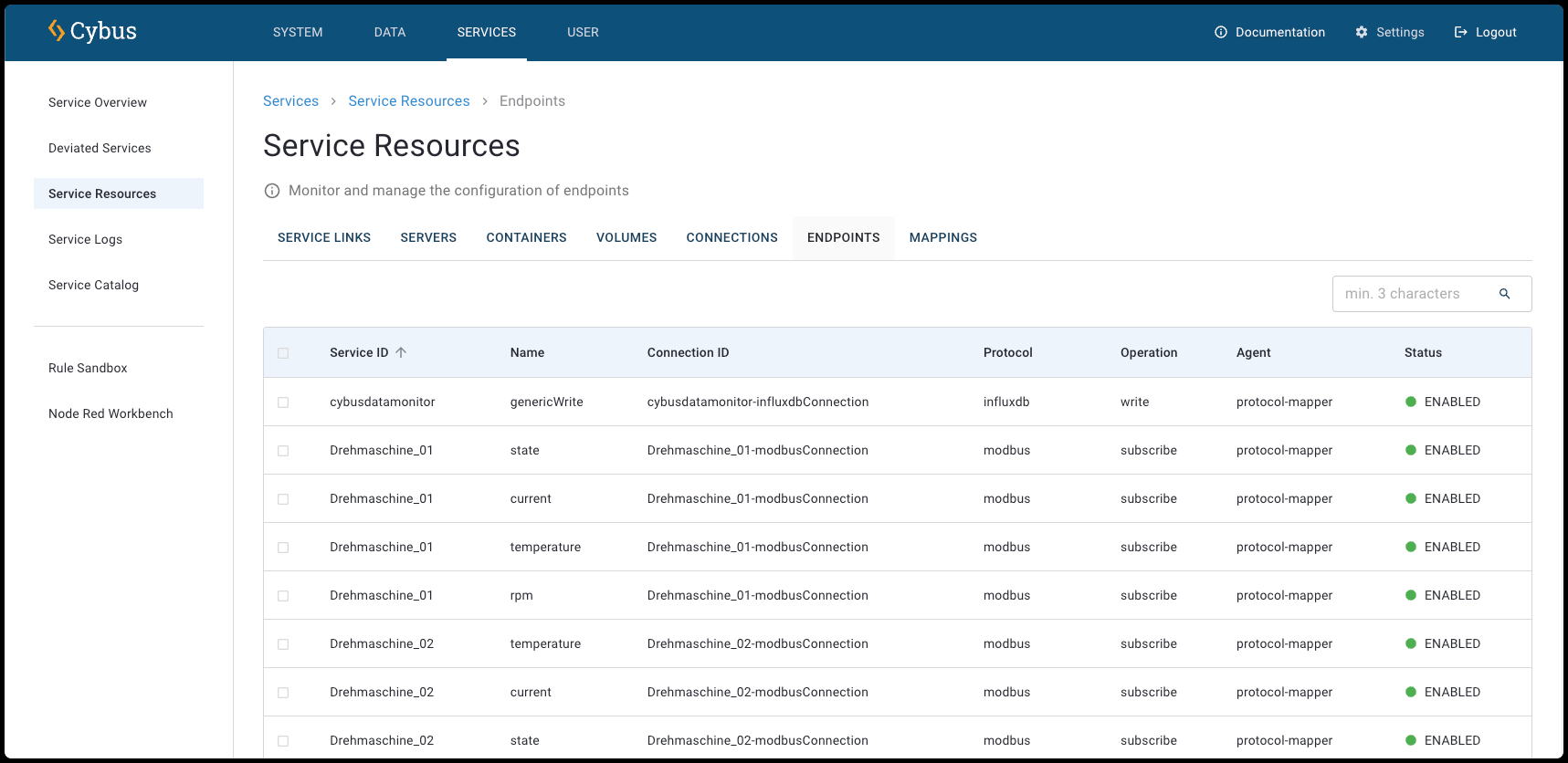
Endpoints View
In the list, all endpoints are displayed with the following information:
**Service ID**
* The unique identifier of the service that contains this endpoint.
**Name**
* The name of the endpoint (e.g. current, rpm, temperature).
**Connection ID**
* The unique identifier assigned to this specific endpoint within the service.
**Protocol**
* The communication protocol used for the endpoint (e.g., Modbus, HTTPS, OPC UA).
**Operation**
* The operation type of the endpoint (e.g., subscribe or publish).
**Agent**
* The agent that is assigned to the endpoint.
**Status**
* The current state of the endpoint (e.g., enabled or disabled).
## Endpoint Details View
* To open the **Endpoint View** for a specific service, click **Services** > **Service Overview** and select a service. In the **Service Details View** of the selected service, click the **Endpoints** tab.
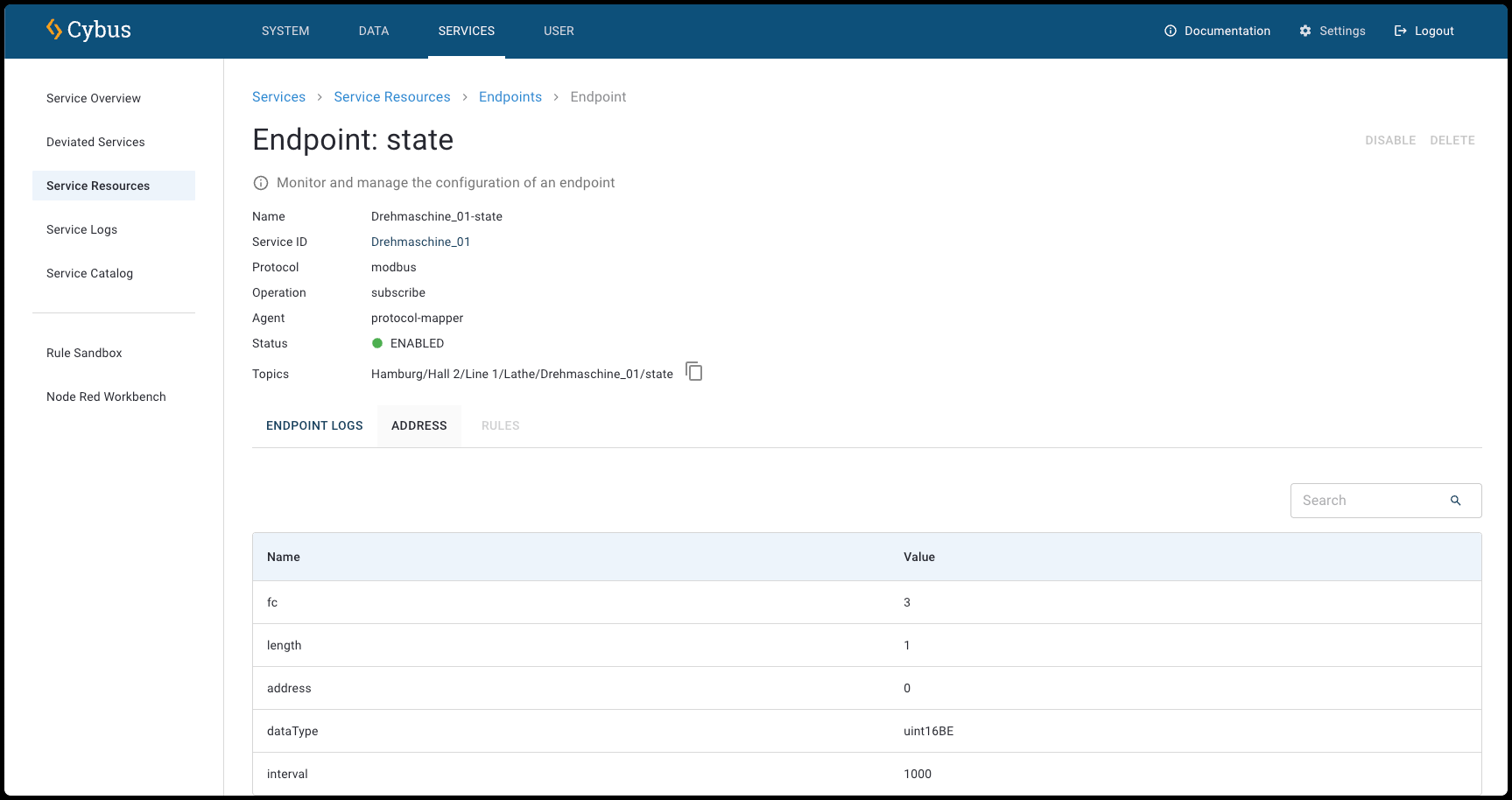
Endpoint Details View
At the top of the **Endpoint Details View**, the following information is displayed:
**Name**
* The name of the endpoint (e.g. current, rpm, temperature).
**Service ID**
* The unique identifier of the service that contains this endpoint.
**Protocol**
* The communication protocol used for the endpoint (e.g., Modbus, HTTPS, OPC UA).
**Operation**
* The operation type of the endpoint (e.g., subscribe or publish).
**Agent**
* The agent that is assigned to the endpoint.
**Status**
* The current state of the endpoint (e.g., enabled or disabled).
**Topics**
* The topic of the endpoint. You can monitor all topics in the Data Explorer.
## Resources of Endpoints
Each endpoint has resources itself.
* To open the resources of endpoints, click an endpoint in the **Endpoints View**.
### Endpoint Logs
You can view detailed log messages for the endpoints of the selected service in the **Endpoints Logs tab** of the **Endpoint Details View**.
**Download CSV**
* Export the visible log entries as a CSV file.
{% hint style="info" %}
The log entries in the CSV file are limited to the most recent 500 lines in the current view. To download the raw logs that contain the full logs, see [Logs of All Services](/2-1-2/documentation/services/service-logs/service-logs-of-all-services.md).
{% endhint %}
**Refresh Logs**
* Refresh the log messages to show the most recent entries.
**Filter**
* Use these filters to focus on specific service log message types based on your troubleshooting or monitoring needs. You can filter for **Debug**, **Error**, **Fatal**, **Info**, **Trace**, and **Warn** messages.
**Start Time/End Time**
* Select a specific start date/time and end date/time to define the period for which you want to view log messages.
**Search**
The search allows you to filter the list.
* Minimum search length is 3 characters.
* Search services by service ID or name.
* Search resources by name, ID, protocol, parent resource ID, agent name, or service ID.
* Search is case-insensitive.
**Level**
* The type of message. For example, info or warning.
**Time**
* Shows the exact date and time when each log message was generated.
**Message**
* Displays the message of the log (e.g., **lathe\_01: Enabled InfluxdbEndpoint**).
#### Log Details Dialog
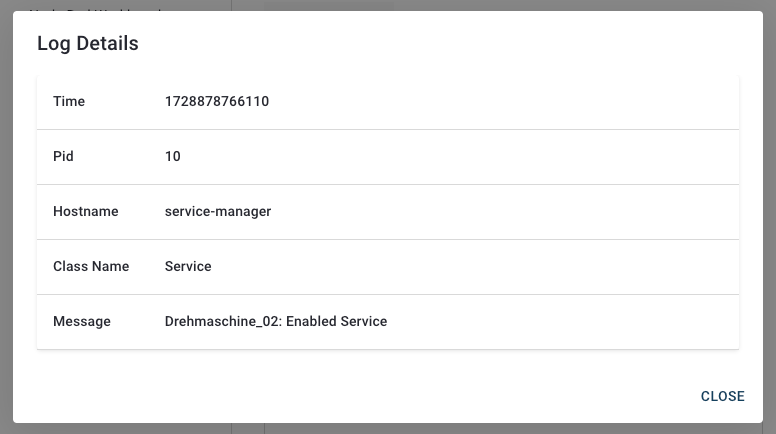
The **Log Details dialog** provides in-depth information about specific log entries in the service logs.
* To open the **Log Details dialog**, click a log entry of a service.
When you select a log entry, this dialog displays the following fields:
**Time**
* The timestamp of the log entry in Unix milliseconds format (.e.g., **1728878765733**).
**Pid**
* The Process ID associated with the log entry.
**Hostname**
* The name of the host or service that generated the log (e.g., **protocol-mapper**).
**Class Name**
* The class or category of the log entry (e.g., **InfluxdbEndpoint**).
**Message**
* A detailed description of the logged event. Example: **lathe\_01: Enabled ModbusEndpoint**
### Address
The **Address** lists the address property specified for the endpoint in the service commissioning file.
**Name**
* The name of the address (e.g. length or interval).
**Value**
* The value of the address.
**Search**
* Find specific addresses by keyword.
### Rules
The **Rules tab** lists associated Rule Engine rules for the endpoint. The rules define how data should be processed between subscribing and publishing. For more information, see [Rule Engine](/2-1-2/documentation/services/rule-engine.md).
---
# Agent Instructions
This documentation is published with GitBook. GitBook is the documentation platform designed so that both humans and AI agents can read, navigate, and reason over technical content effectively. Learn more at gitbook.com.
## Querying This Documentation
If you need additional information that is not directly available in this page, you can query the documentation by asking a question.
Perform an HTTP GET request on the following URL with the `ask` and `goal` query parameters:
```
GET https://docs.cybus.io/2-1-2/documentation/services/service-resources-view/endpoints-view.md?ask=&goal=
```
`ask` is the immediate question: it should be specific, self-contained, and written in natural language.
`goal` is what the user is ultimately trying to achieve, the reason they need the answer. Sharing it helps GitBook give you a better, more relevant answer. A goal is most helpful when it describes the outcome the user wants rather than restating the question. For example, with `ask=how do I create an API token`, a goal like `automate deployments from our CI pipeline` lets GitBook tailor the answer to that use case.
The response will contain a direct answer to the question and relevant excerpts and sources from the documentation.
Use this mechanism when the answer is not explicitly present in the current page, you need clarification or additional context, or you want to retrieve related documentation sections.