> For the complete documentation index, see [llms.txt](https://docs.cybus.io/llms.txt). Markdown versions of documentation pages are available by appending `.md` to page URLs; this page is available as [Markdown](https://docs.cybus.io/access/user-management.md).
# User Management
Control who can access Connectware and what they can do there.
This section covers everything from creating your first users to integrating with your corporate identity provider, along with the roles and permissions in between.
{% hint style="info" %}
Managing users and roles requires the `connectware-admin` role or equivalent permissions.
{% endhint %}
## Authentication and Authorization
Two distinct concerns govern access in Connectware:
* **Authentication** — verifying identity. Who is this person or system, and can they log in? Connectware supports local username/password, single sign-on via Microsoft Entra ID or LDAP, and certificate-based authentication for MQTT clients.
* **Authorization** — controlling access. What can an authenticated user do? Authorization is managed through permissions assigned to roles, which are then assigned to users.
Keeping these concepts separate helps when troubleshooting access issues: if a user cannot log in, the problem is authentication; if they can log in but cannot access something, the problem is authorization.
## The Authorization Model: Users, Roles, and Permissions
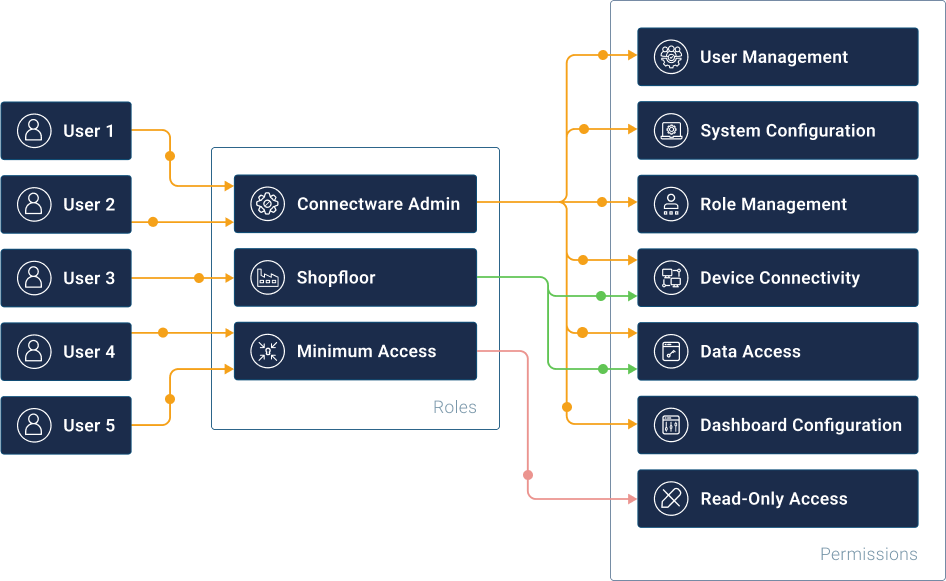
Connectware uses role-based access control (RBAC), built on the following components:
* **Permissions** — a single access right to a specific resource, either an MQTT topic or an HTTP endpoint, with read, write, or read/write access.
* **Roles** — a named collection of permissions. Roles let you define a permission set once and apply it to many users.
* **Users** — a known identity (a person or a software client) that has one or more roles assigned, and optionally individual permissions on top.
Permissions are grouped into roles. Roles are assigned to users.
Manage access through roles rather than assigning permissions directly to users. This keeps your access control consistent and easy to audit: when a team member changes responsibilities, you update one role rather than every affected user.
Connectware includes the following built-in roles:
* **`connectware-admin`** — full administrative access to Connectware and all its features.
* **`minimum-access`** — read-only access to the Admin UI with no data permissions. A useful baseline for users who need visibility without write access.
## What's in This Section
| Topic | What you'll find |
| ----------------------------------------------------------------------------------------- | ------------------------------------------------------------------------------ |
| [Initial Setup](/access/user-management/initial-setup.md) | Where to start: the setup workflow for a new installation |
| [Users](/access/user-management/users.md) | Creating, editing, and deleting users; assigning roles and permissions |
| [Roles](/access/user-management/roles.md) | Creating and managing roles; built-in roles reference |
| [Permissions](/access/user-management/permissions.md) | How permissions work; MQTT and HTTP permission syntax; viewing all permissions |
| [Access Control for Admin UI](/access/user-management/access-permissions-for-admin-ui.md) | Controlling which Admin UI features are available to each role |
| [MQTT Client Access](/access/user-management/mqtt-user-authentication.md) | Authentication options for programmatic MQTT clients (password and mTLS) |
| [Multi-Factor Authentication](/access/user-management/multi-factor-authentication.md) | Adding a second factor to local and LDAP user accounts |
| [Single Sign-On](/access/user-management/single-sign-on-sso.md) | Integrating with Microsoft Entra ID or LDAP |
## Connecting Machines and Devices
For machines and hardware devices connecting to Connectware over MQTT, use the [Client Registry](/access/client-registry.md) rather than manually creating user accounts. It provides:
* **Self-registration** — devices register themselves via MQTT or REST API.
* **Controlled approval** — an administrator reviews and approves each registration request.
* **Certificate support** — devices can authenticate with signed certificates instead of passwords.
* **No default permissions** — newly registered devices start with no access, giving you precise control.
---
# Agent Instructions
This documentation is published with GitBook. GitBook is the documentation platform designed so that both humans and AI agents can read, navigate, and reason over technical content effectively. Learn more at gitbook.com.
## Querying This Documentation
If you need additional information that is not directly available in this page, you can query the documentation by asking a question.
Perform an HTTP GET request on the following URL with the `ask` and `goal` query parameters:
```
GET https://docs.cybus.io/access/user-management.md?ask=&goal=
```
`ask` is the immediate question: it should be specific, self-contained, and written in natural language.
`goal` is what the user is ultimately trying to achieve, the reason they need the answer. Sharing it helps GitBook give you a better, more relevant answer. A goal is most helpful when it describes the outcome the user wants rather than restating the question. For example, with `ask=how do I create an API token`, a goal like `automate deployments from our CI pipeline` lets GitBook tailor the answer to that use case.
The response will contain a direct answer to the question and relevant excerpts and sources from the documentation.
Use this mechanism when the answer is not explicitly present in the current page, you need clarification or additional context, or you want to retrieve related documentation sections.